The product
Everything a school runs on,
in one place.
AcademIQ is not a records system with bolt-ons. Attendance, marks, invoices, payroll and messages all point at the same student and the same staff member — which is why the numbers agree without anyone exporting anything into a spreadsheet to check.
Exams & marks
Exams, marks and report cards
Set the exam timetable, enter marks for a whole class at once, then publish when you are ready. Positions, subject averages and report cards are worked out for you from the marks you entered — you never type the same number twice.
- From exam timetable to resultCreate an exam, set a date for each paper, enter the marks, then publish. Class positions and subject averages are calculated automatically.
- Tests and assignments tooQuizzes, tests, projects and assignments each count for however much you decide, and add up to the grade using your school's own grading scale.
- Report cardsTerm report cards, monthly progress reports and exam reports — built from the same marks the parent already sees, so they always match.
- CertificatesIssue certificates to students and staff. Each one carries a code that anyone can use to check it is genuine, without needing an account.
Attendance
Attendance the parent hears about the same morning
Teachers mark the register in seconds. If a child is absent or late, the parent is told straight away rather than at the end of term. Patterns nobody has time to spot show up on a simple chart.
- Students and staffPresent, absent, late, excused or half-day for students. Leave types for teachers, with their own reports you can download.
- Parents told the same day, on WhatsAppAn absence or a late mark reaches the parent straight away over WhatsApp, SMS or email — whichever they actually read. A daily summary goes out at whatever time you choose, from your school's own messaging account.
- Spot the pattern earlyA simple chart shows attendance by class and by student, so a child slowly dropping off is noticed in week three rather than at the end of term.
Fees & salaries
Fees collected and salaries paid
Set your fee amounts once and the system issues them, tracks who has paid and shows what is still outstanding. On the other side: staff salaries, allowances, deductions and payslips.
- Fees that match how you chargeMonthly, quarterly or yearly, set per class or per student, with discounts and one-off charges handled properly instead of in a side spreadsheet.
- Paying onlineParents can pay by card, and the money goes into your school's own bank account. If you run several campuses, each one collects into its own.
- Salaries and payslipsBasic pay, allowances and deductions for each staff member, run for each month, with a payslip every employee can download themselves.
- The numbers you get asked forHow much has been collected, how much is outstanding, and what percentage that is — always up to date, never a month behind.
Messages
One place for school messages
Messages between staff, parents and students, plus announcements to the whole school. Everything stays on the school's record instead of on someone's personal phone.
- Direct messagesA teacher can message a parent without handing out their personal number, and the conversation stays with the school when that teacher moves on.
- AnnouncementsSend to the whole school or just one group, and mark it urgent when it is — so a closure notice does not look like a reminder about uniforms.
- Parent-teacher meetingsSet meeting times, tell parents, and write down what was agreed against the student so next year's teacher knows the history.
- Told as it happens, on the channel they readMarks published, fees due, attendance marked, a new message — each reaches the right person the moment it happens, over WhatsApp, SMS or email. Your school connects its own messaging account, so alerts come from your school's number.
Setting up
Set the school up once, then run it
Sessions, classes, sections, subjects and timetables. Staff accounts and what each of them can see. Bring in the lists you already have. All done from inside the software, without needing a developer.
- Your school's structureAcademic sessions, classes and sections, subjects, which teacher takes what, and a weekly timetable with rooms.
- Roles that fit real jobsThe standard roles cover most people. When someone's job does not fit one — a bursar, a head of year — build a role that does, instead of giving them full access.
- Bring your existing listsUpload your student and staff lists from a spreadsheet. If a row has a problem, you are told which row and what is wrong, rather than the whole file being rejected.
- Guided setupA step-by-step setup takes your administrator through structure, people, branding and settings, and will not let you go live until the essentials are done.
Module inventory
The full list, without the marketing gloss
Everything below is built and running in the system today — not planned, not in beta. If something you need is missing, say so on the demo call and we will tell you plainly whether it exists.
Students & people
- Student records with guardians, documents and medical notes
- Enrollment and class assignment per academic year
- Staff records with roles, subjects and employment details
- Bulk CSV import with per-row validation and error reporting
- Invitation-based onboarding for staff, parents and students
- Student self-service accounts
Attendance
- Daily student register: present, absent, late, excused, half-day
- Teacher attendance with leave types and on-leave states
- Immediate guardian email on absence or lateness
- Scheduled daily digest at a time you configure
- Attendance dashboard with per-class and per-student trends
- CSV export of attendance records
Academics
- Exam creation, per-class and per-subject paper scheduling
- Bulk result entry with publish control
- Rankings and subject-level statistics
- Continuous assessment: quizzes, midterms, finals, projects
- Weighted scoring and configurable letter-grade scales
- Report cards, monthly progress reports and exam reports
- Exam calendar view
Finance
- Fee structures: monthly, quarterly and annual
- Per-class and per-student assignment with discounts
- Invoices with payment status tracking
- Card payments settling into each school's own bank account
- Payroll with basic salary, allowances and deductions
- Payslip generation and staff self-service retrieval
- Collection rate and outstanding balance reporting
Scheduling & communication
- Weekly class timetable with subject, teacher, room and colour
- Parent-teacher meeting scheduling and notification
- Threaded direct messaging between staff, parents and students
- School-wide announcements with priority levels
- Notifications that arrive the moment something happens
- Virtual class links for online sessions
Administration & governance
- Academic years, classes, sections and subjects
- Custom roles built around real jobs at your school
- School branding: logo, colours and your own sign-in page
- Guided setup wizard with a go-live checklist
- Certification issuing with public verification codes
- A running record of who changed what, and when
- Interface translation: English, Arabic, Hindi, Chinese
Reporting
The figures leadership asks for, already calculated
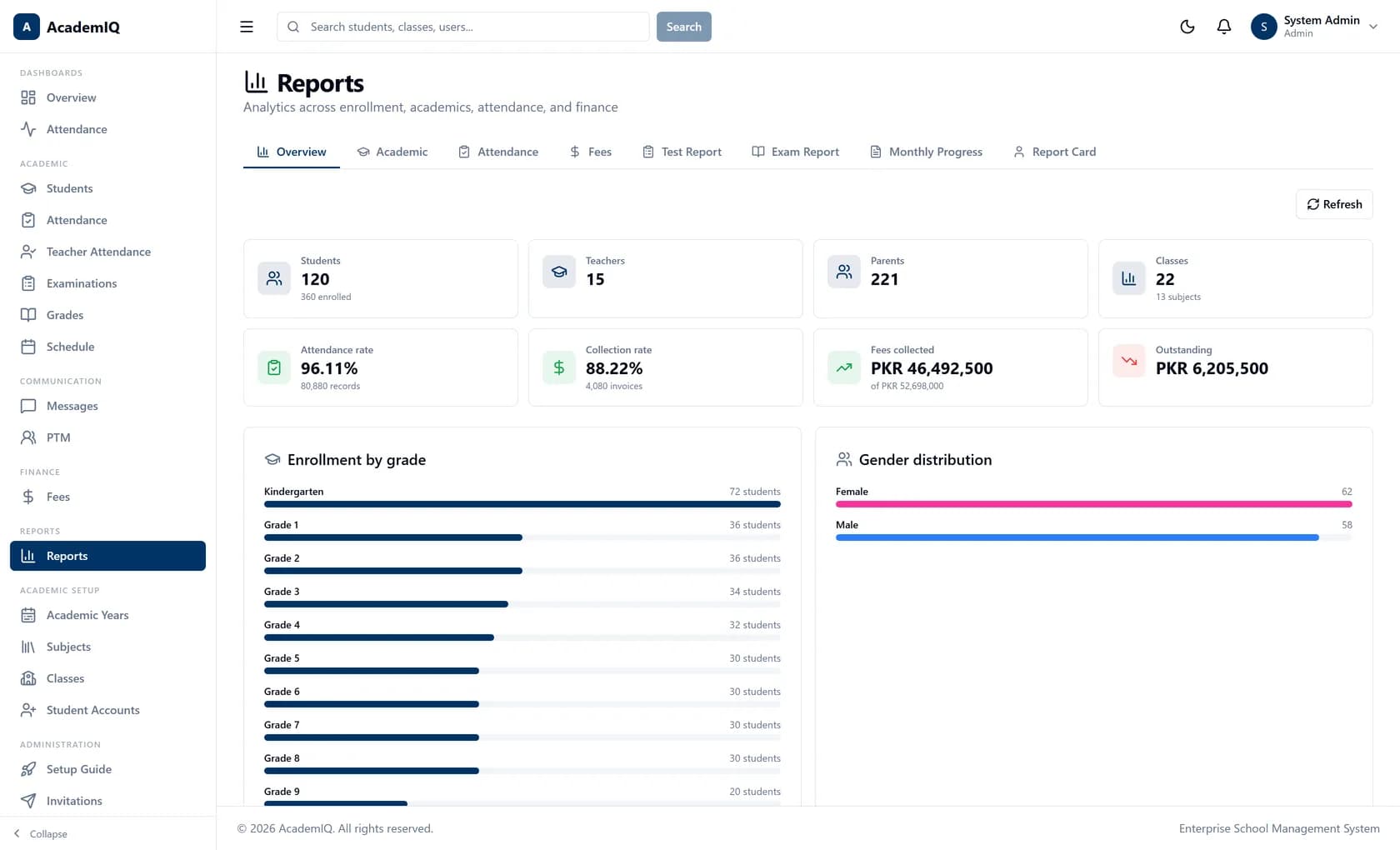
Enrollment, attendance rate, collection rate, fees collected and outstanding balance — derived from live records rather than assembled by somebody staying late with a spreadsheet.
- Overview, academic, attendance and fee report tabs
- Test reports, exam reports and monthly progress reports
- Per-student report cards from the same marks parents see
- Enrollment and gender distribution breakdowns
See it running on your school's terms
Thirty minutes on the live system, driven by your workflows rather than a slide deck. Bring the awkward cases — the mid-year transfer, the sibling discount, the campus that does things differently.
- 30 minutes, live system
- Pricing discussed on the call